For Infobip ConversationsAn outbound dialer by Codified

Outbound call campaigns that only dial when an agent is free.

LekkaDial is the contact centre dialer for Infobip. Supervisors run campaigns from one web console. Agents keep working in Infobip Conversations, and no customer is left waiting on a silent line.

Create an organisation Talk to us Needs an Infobip account with Conversations. See what you need
LekkaDial · Live
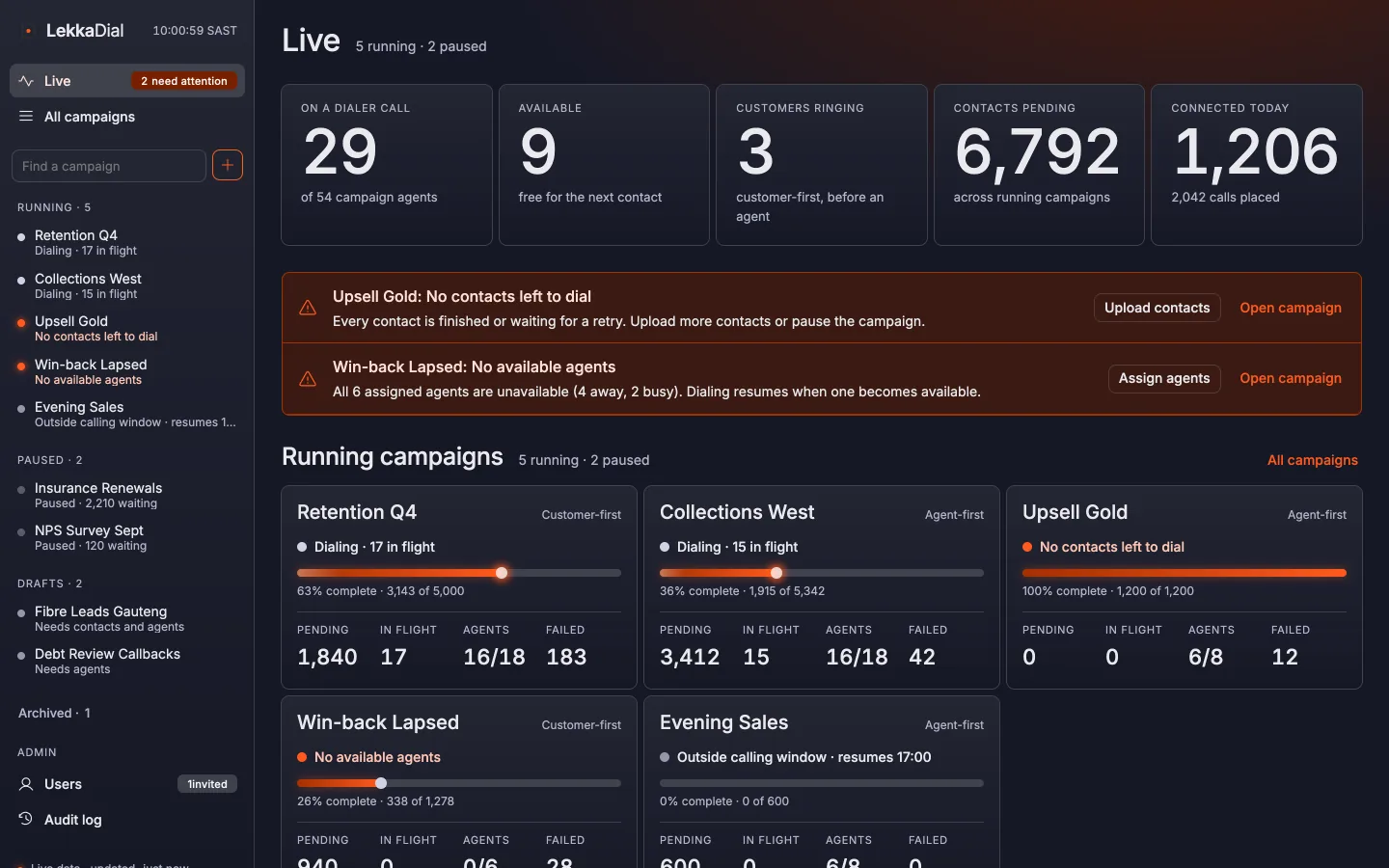
The LekkaDial live board: agents by state, running campaigns with progress bars and health alerts.
The live board: every agent's state, campaign progress and plain-language health alerts, refreshed every few seconds.

The outbound gap

Infobip is a strong agent workspace. It has no campaign dialer.

Manual dialling

Agent time goes to lookups, typing numbers, waiting on rings and admin between calls.

Predictive dialers

They over-dial to keep agents busy, and leave customers in silence or on a long hold when nobody is free.

LekkaDial

Paces every call against real agent availability in Infobip. Agents stay busy, and customers are never rung without someone ready.

How it works

Two dialling modes, one rule

Each campaign runs as a preview dialer or a progressive dialer. Both only dial for agents who are free right now, so LekkaDial never rings more customers than there are free agents.

Agent-first

Preview dialer

When an agent becomes free, LekkaDial opens a call conversation for them in Infobip. The agent reads the customer's details and clicks Call, so they're prepared before the customer answers.

  1. 01LekkaDial claims the next contact for a free agent
  2. 02A call conversation opens in Infobip with the customer card
  3. 03The agent clicks Call and the customer answers
  4. 04The agent picks an outcome; the contact completes or is retried

Best for sales, collections, retention, VIP and sensitive calls.
Customer-first

Progressive dialer

When an agent becomes free, LekkaDial rings one customer. If they answer, they hear a short hold message and are connected into Infobip Conversations for a free agent to accept.

  1. 01LekkaDial rings one customer per free agent
  2. The customer answers and hears a short hold message
  3. 03Infobip routes the call to a free agent, who accepts it
  4. 04The agent picks an outcome; the contact completes or is retried

Best for reminders, confirmations, surveys and lead qualification.

Calling hours apply

No calls are placed outside a campaign's calling window.

Capped, automatic retries

No answer, Busy, Voicemail and Callback requeue the contact after the retry delay, up to each campaign's limit.

No double calls

The same number is never dialled twice at the same time.

Wrap-up is respected

The next call waits until Infobip marks the agent available again.

Supervisor console

Every outbound campaign, live, in one place

The screens below are the working console, not mock-ups.

Run campaigns, see their health

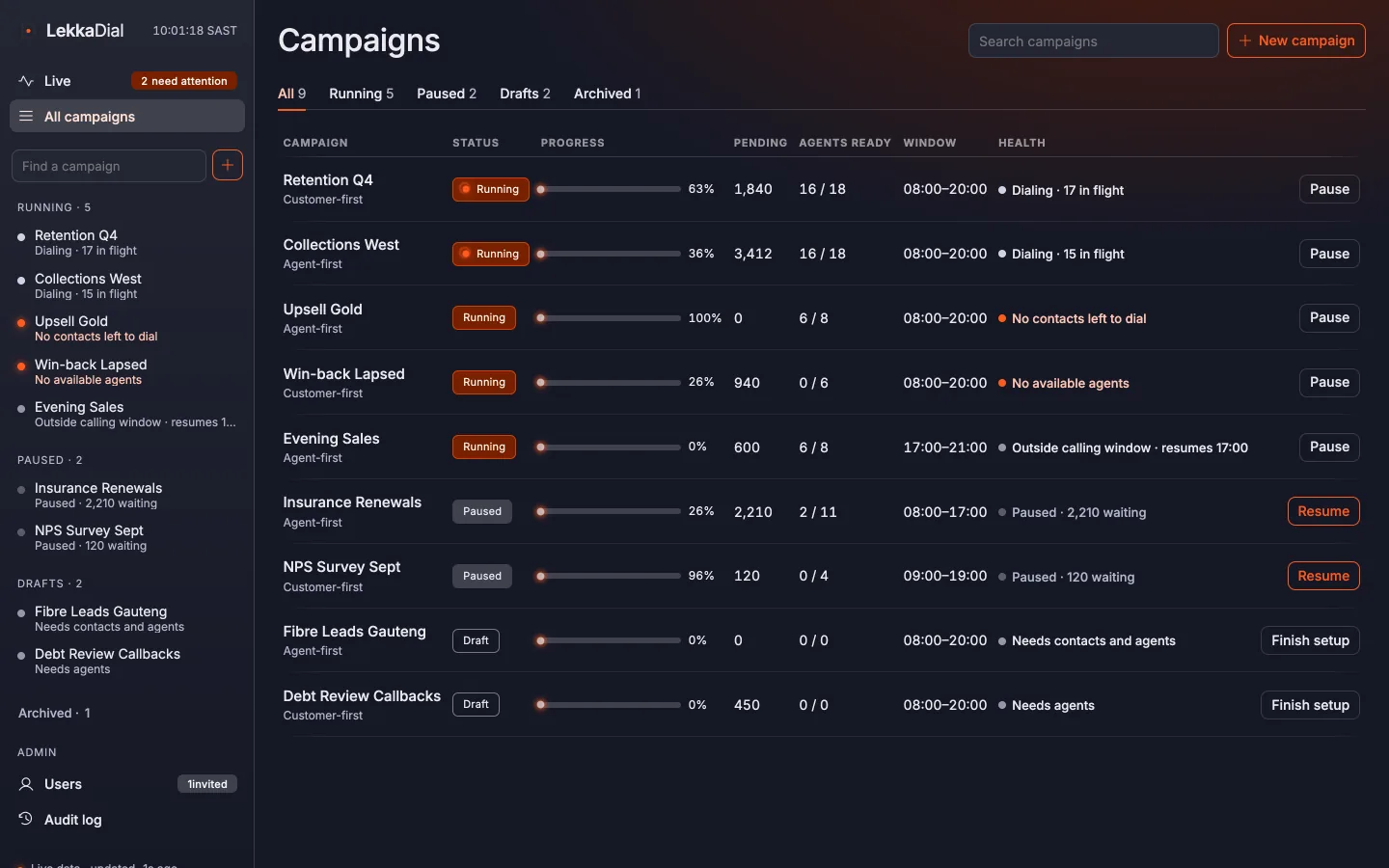
Create, start, pause, restart and archive outbound call campaigns. Each one shows its progress and a plain-language alert when something needs attention: "No agents are free", "No agents assigned", "Outside calling window".

Retention Q4 · 62% complete
LekkaDial · Campaigns
The campaign list, with each campaign's status, progress and health alert.
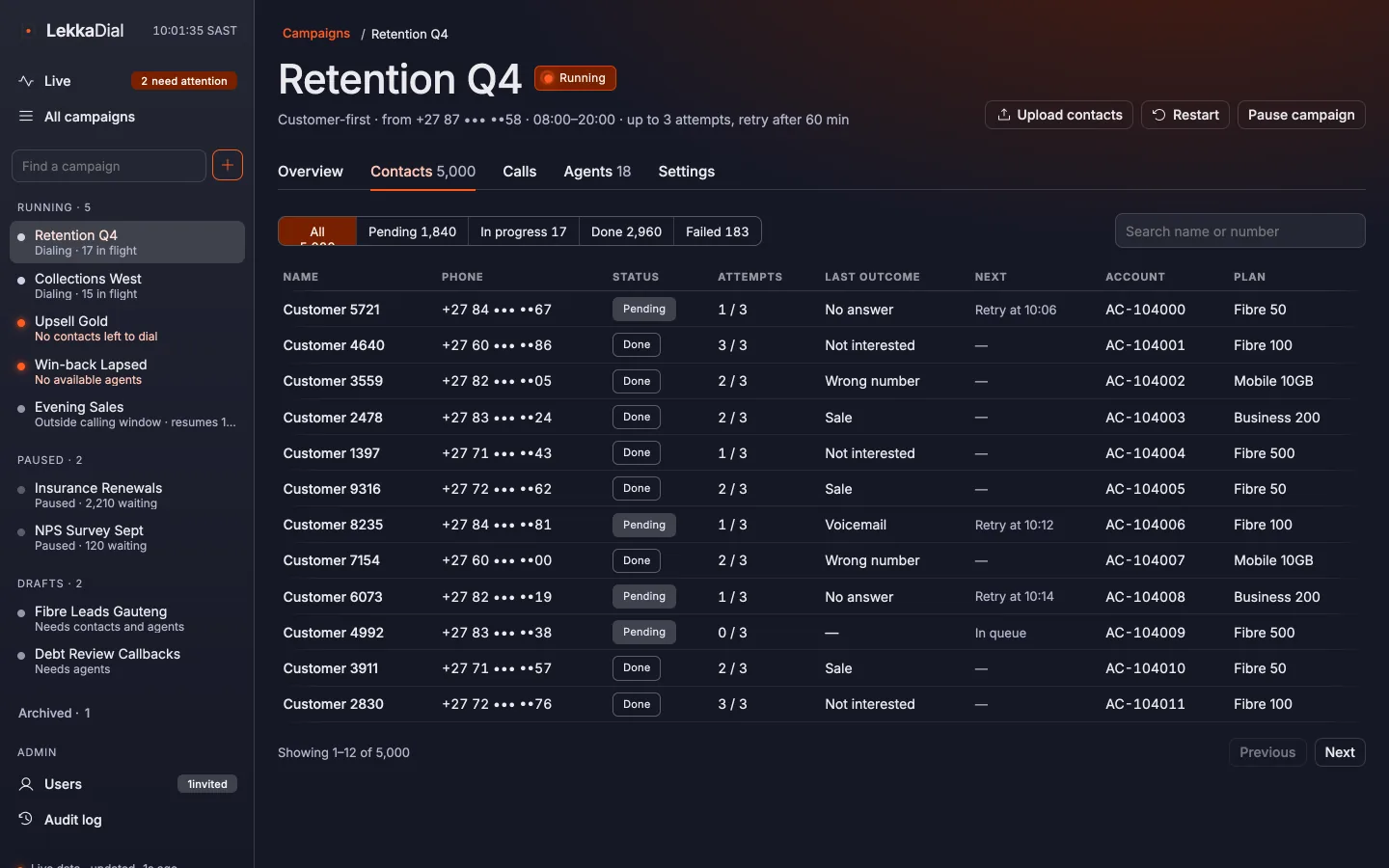
LekkaDial · Contacts
A campaign's contacts, with each contact's status, attempts and last outcome.

Upload contacts without surprises

Preview a CSV, map its columns and see duplicates and invalid numbers before anything is added. Skipped rows can be downloaded. Local numbers are normalised to E.164, with South Africa as the default.

Every call, every outcome

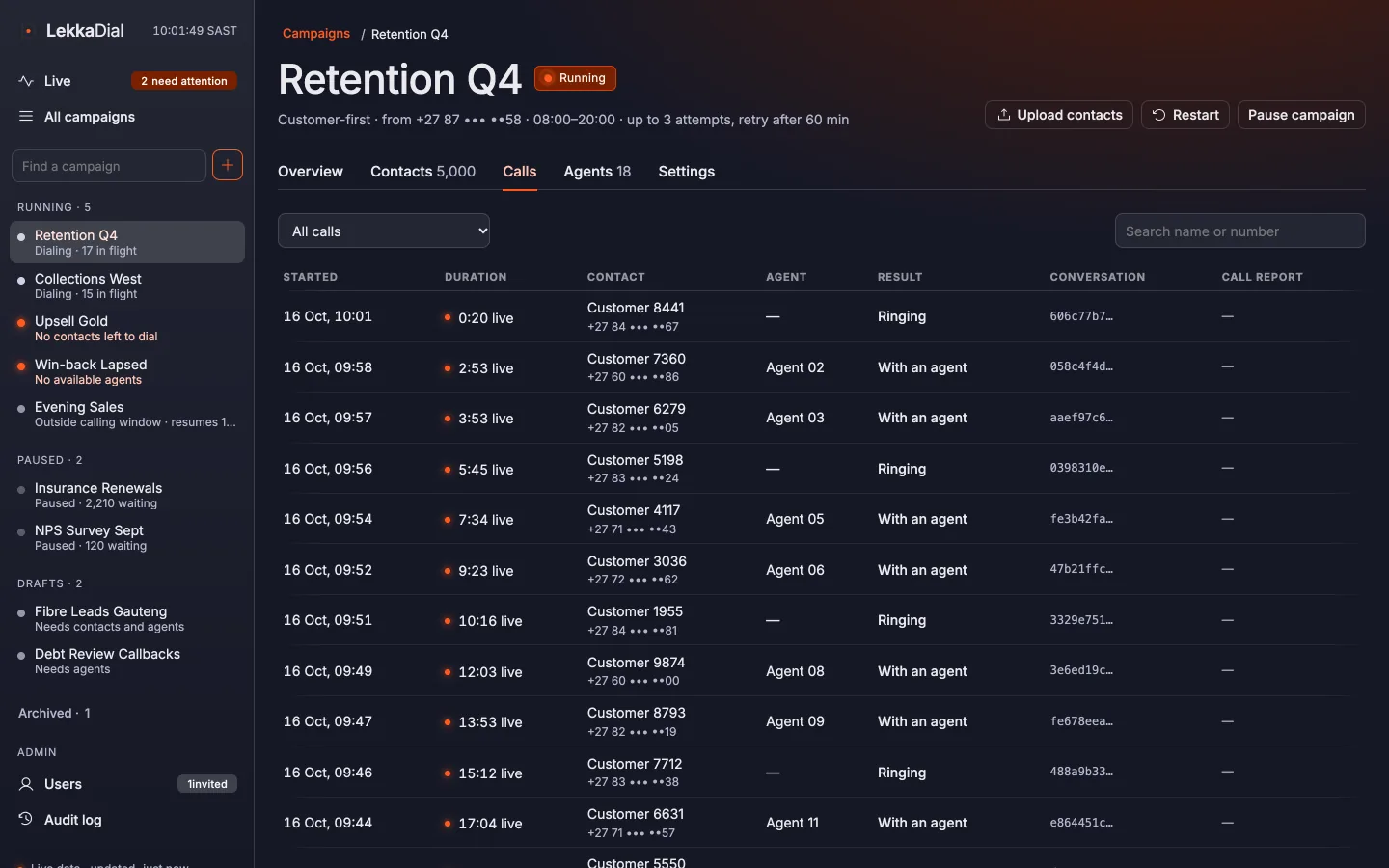
Call history shows each attempt with its agent, outcome and attempt number. Outcomes that aren't final are scheduled for retry automatically.

Lekka! 3 sales in the last minute
Naledi Mokoena on Retention Q4, plus 2 more.
LekkaDial · Calls
A campaign's call history: each attempt with its agent, outcome and attempt number.

For agents

Nothing new to learn

Agents never open LekkaDial. Dialer calls arrive in Infobip Conversations, with no separate app, login or training.

Customer card
Name, number, campaign, attempt count, last outcome and any extra CSV columns, beside every call.
Outcome form
The agent picks a result when closing the conversation. It decides whether the contact is finished or retried.
Searchable titles
Conversation titles include campaign and contact details, so calls are easy to find and report on in Infobip.

Get started

What you need before you start

LekkaDial dials through your own Infobip account. It reads your agents, places the calls and opens the conversations there.

Prerequisites

  • An Infobip account with Conversations

    Your agents work in Infobip Conversations. LekkaDial uses their availability to pace calls.

  • An Infobip voice number enabled for Conversations calls

    It's the caller ID customers see. Each campaign can use its own.

Not on Infobip yet? Talk to us and we'll help you get set up.

Then, three steps

  1. 1
    Create an organisation

    You become its Owner and set up two-step verification.

  2. 2
    Connect Infobip

    Sign in with Infobip, or paste an API key. LekkaDial subscribes to the events it needs.

  3. 3
    Create a campaign

    Upload a contact list, assign agents and start dialling.

Create an organisation

FAQ

Questions

Anything else? info@codified-holdings.com

What do I need before I start?

An Infobip account with Conversations, and an Infobip voice number enabled for Conversations calls. LekkaDial connects to that account with an Infobip sign-in or an API key.

Do agents need to install anything?

No. Agents never open LekkaDial. Dialer calls arrive in Infobip Conversations, the workspace they already use, with the customer's details on screen.

What is the difference between preview and progressive dialling?

In preview (agent-first) mode, the agent sees the customer card and clicks Call. In progressive (customer-first) mode, LekkaDial rings one customer per free agent, plays a short hold message and connects them to a free agent when they answer.

Does LekkaDial ever call more customers than there are free agents?

No. Both modes only dial for agents who are free right now in Infobip, and the next call waits until an agent's wrap-up is done.

How do contact lists work?

Upload a CSV, map its columns and review duplicates and invalid numbers before anything is added. Local numbers are normalised to E.164, with South Africa as the default country. Extra columns appear on the customer card.

Who can use the console?

Owners, Admins, Supervisors and Read-only users, each with their own sign-in and two-step verification. Every change and sign-in is kept in an audit log.

How is LekkaDial priced?

Monthly plans by agent count, each with a bundle of calls. Calls over the bundle are billed in arrears, and SLA support packages are available. See the pricing page for an estimate.

I'm an Infobip partner. Can I offer LekkaDial to my clients?

Yes. Email info@codified-holdings.com and we will talk through how partners can resell or run LekkaDial for their clients.

Howzit. Ready when your agents are.

Create an organisation, connect your Infobip account and run your first outbound campaign.